IIS supports ISAPIs, which are DLLs that process Internet client requests for certain types of pages. IIS supports requests for ASP pages using the
ASP.DLL ISAPI extension.
As hundreds of requests come in for a specific web site, IIS assigns a thread for each request. However, instead of creating a new thread for each request, a pool of worker threads is maintained to process incoming requests. This thread-pooling algorithm saves server resources in terms of creating/destroying threads for each request, and sets an upper limit on the number of threads to conserve other important server resources.
Incoming requests are serviced on a FIFO basis. As more requests come in, the queue will grow larger. However, IIS sets a configurable maximum capacity
(RequestQueueMax, default = 500 requests) for the queue so the request queue does not grow too large.
The WAM component is installed inside MTS. Therefore, it is MTS that provides the threads to IIS in the form of STAs. When an ASP page is requested, any script in the page including object instantiation is executed on an STA that is provided by MTS. Any COM object created will have page scope and all calls into it will be made from the single thread in the STA. MTS maintains per package a pool of 100 STAs that are used to process users’ requests, but IIS reduces the number to 25 STAs.
Therefore, the threading model for a component will be in order of preference:
IIS architecture is based on a component called the Web Application Manager –
WAM. The WAM is an MTS-registered COM object whose functionality is to locate and load an ISAPI DLL to process
each client request. Each IIS application has a WAM component responsible for the application’s ISAPI functionality.
Note that even the WAM is an MTS-registered object, its transactional attribute is
Does not support Transactions. But don’t the WAM objects load and execute the ASP pages?
When the WAM object receives a request for an ASP page, the WAM object creates another system object, the
Page object. It is the Page object that processes the ASP page directly, instantiating any objects that the ASP requires. Like the WAM object, the Page object executes within MTS.
When the Page object is first created, it checks the transactional attributes of the ASP page:
<%@ TRANSACTION=REQUIRED %>
If a transaction is required, the Page object is created within a new MTS transaction, causing the Page object to be at the root of the transaction. What does this mean to COM objects created from the ASP page? It means that the client (the ASP page) is executing within a transaction and therefore the COM objects, if they are registered under MTS as transactional, will enter the transaction, i.e., IObjectControl:::Activate() is called, and so on. On the other hand, if the COM objects are not registered under MTS, then they will not participate in the transactions and all actions performed by these objects are outside the scope of the client’s transaction.
Each new web site or virtual directory in IIS is integrated with MTS in the following manner:
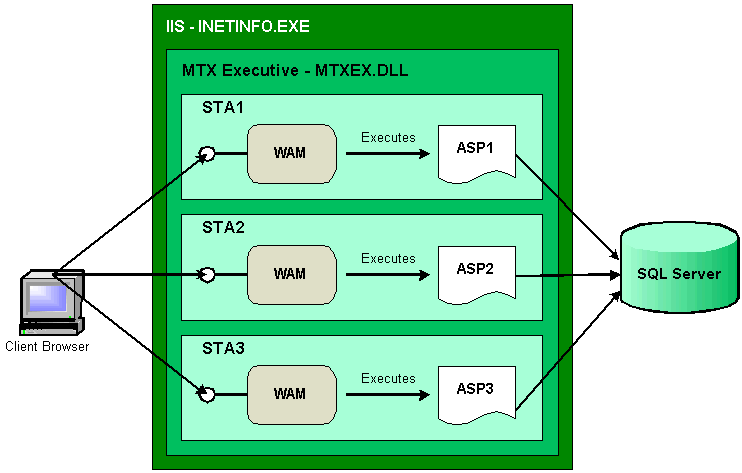
The basic integration between IIS and MTS is shown below for the two cases of a web site/virtual directory. Note that for a given web site/virtual directory, as the number of client requests increases, IIS will allocate more STAs to service client requests, with each STA having its own WAM object to process the requested ASP page.
Web Site/Virtual directory runs in the address space of INETINFO.EXE
Web Site/Virtual directory runs in its own address space - MTX.EXE
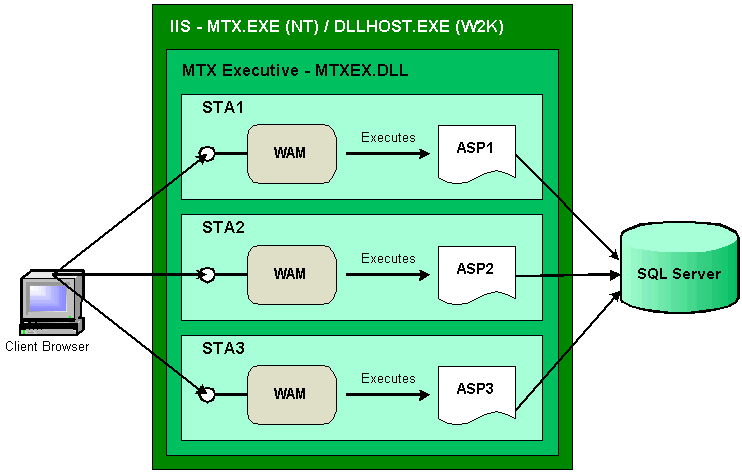
Each IIS web site / virtual directory will be part of an IIS-generated MTS package. If the web site / virtual directory will run in the address space of INETINFO.EXE, the web site/virtual directory will be part of the
IIS In-Process Application MTS package that will run under INETINFO.EXE. If the web site/virtual directory will run in its own address space of
MTX.EXE, the web site/virtual directory’s MTS package will run under MTX.EXE.
Assume the package is configured to run in isolation (i.e., under MTX.EXE): When client requests for ASP pages start coming in, IIS will allocate from the MTS pool of STAs an STA for each client request (see diagram above).
Within each STA, a WAM object is created to process the requested ASP page. If the ASP page creates a COM object using
Server.CreateObject, IIS will call IObjectContext::CreateInstance to create the object. Note the context object is available because the COM object is running under the MTS executive. In fact, any COM object invoked by an ASP page will have the context object available by virtue of being run with the MTS executive. And because
IObjectContext::CreateInstance was used to create the object, the object (if transactional) will join the caller’s transaction (if available). In addition,
OnStartPage / OnEndPage will be called. On the other hand, if the object was created with
CreateObject, then it cannot join any caller transactions, and
OnStartPage / OnEndPage will not be called.
In the following, recall that a COM object can only enter transactions IF it is registered in a COM+ application and configured to require a transaction. Otherwise, it will NEVER enter a transaction NOR can it affect the outcome of any transaction.
| ASP Transactional | COM Transactional | Notes |
| No | No (object may or may not be in a package/application) | If the object is not in an MTS package/COM+ application, the object does not get Activated / Deactivated. But if object is in an MTS package/COM+ application, the object does get Activated /
Deactivated.
In either case (in a package/application or not), the object context can still be obtained using GetObjectContext(). Because this object is non-transactional it won’t enter any transactions, but its object context can be used to create other COM objects that may be transactional. Note that all these objects will be part of the same activity. |
| No | Yes (object must be in a package / application) | The COM object must be in an MTS package/COM+ application. The component behaves in the usual scenario, except that it runs in the context of its own transactions since its base client did not have a transaction. |
| Yes | No (object may or may not be in a package/application) | If the object is not in an MTS package/COM+ application, the object does not get Activated / Deactivated. But if object is in an MTS package/COM+ application, the object does get Activated /
Deactivated.
In either case (in a package/application or not), the object context can still be obtained using GetObjectContext(). Because this object is non-transactional it won’t enter any transactions, but its object context can be used to create other COM objects that may be transactional. Note that all these objects will be part of the same activity. Note: When the object did not belong to a package/application, the OobjectContext::IsInTransaction () returned 1, but calling SetAbort had not effect on the ASP client committing. |
| Yes | Yes (object must be in a package / application) | The COM object must be in an MTS package/COM+ application. If it configured as ‘Requires transaction’, then it will inherit its client transaction, and calling IObjectContext::SetAbort will cause the ASP transaction to abort, thereby calling OnTransactionAbort() in the ASP page (if available) |
Recall that MTS is STA-based. Any component that wants to use MTS features such as automatic transactions, pooling, role checking, etc., must be built using the Apartment-threading model. For components that will be installed manually into MTS packages, do not use the FTM
(TODO why?)
IUSR_MachineName is a built-in account for anonymous access to Internet Information Services. This account is used whenever an Internet user accesses a web site or virtual directory that runs under INETINFO.EXE.
IWAM_MachineName is a built-in account for Internet Information Services to start out of process applications. This account is used whenever an Internet user accesses a web site or virtual directory that runs in its own process (
mtx.exe for NT4.0 and dllhost.exe for Win2000)
When an internet user accesses an ASP page, the user will be logged on using one of the above pages. In terms of database access, use SQL Server standard security where a UserID and Password are specified as properties when opening a connection.