Physical Deployment & Operational Requirements
Summary
The layers described so far (presentation, business and database) are simply
a convenient way to describe the logical grouping of related components. They
are conceptual rather than physical divisions. How you deploy the actual DLLs
into tiers is driven by how the layers interact with each other and the
different requirements they have in terms of security, operations, and
communication. How you deploy applications depends on many factors such as the
kind of the application being deployed (ASP.NET vs. Windows Forms), the user
base of the application, scalability, performance requirements, organizational
policies, and other factors. In general, a number of physical deployment
patterns can be identified for specific kinds of applications, especially
Internet-base applications.
Physical tiers represent the physical division between the components of your
application, and may or may not map directly to the logical tiers or layers used
to abstract the different kinds of functionality in the application. Physical
tiers may be separated by firewalls or other security boundaries to create
different units of security context. There are two main families of physical
tiers - farms and clusters. A farm consists of identically configured and
extendable set of servers sharing the workload, whereas a clusters is a
specialized set of servers designed to handle failures of individual servers
gracefully.
In general, a number of common infrastructure deployment blocks can be found
in many application deployment environments:
A web-farm is a load-balanced set of web servers. A number of technologies
can be used to implement load-balancing solutions including hardware solutions
(Cisco, Nortel switches and routers), and software solutions such as NLB which
is a feature of Windows Servers. In either case, the principle is the same: a
user makes a request, and the request is services by one of the available
servers, and if one server fails, the load-balancing solution (whether hardware
of software) will remove the failed server from the list of available servers.
Load-balancing can achieve high scalability and availability when incoming
requests have no affinity to any server, i.e., requests can be serviced by any
server.
Consider the following issues when designing web-based solutions that will be
deployed in a web-farm:
- Session State
ASP.NET solutions can be configured to store session data out-of-process on
a remote IIS server, or in a database.
- View State
View state is used in ASP.NET to maintain UI consistency between post-back
requests. View state is implemented as a hidden form field and can be
secured using encryption. In a web-farm environment, this requires
consistency between settings in the machine.config file on each server in
the farm.
- SSL Communication
If you are using SSL to encrypt communication between the client and the web
farm, you need to ensure that affinity is maintained between the client
and the particular web server with which the client established an SSL
session. To maximize scalability and performance, you may choose to use a
separate farm for HTTPS connections, allowing you to balance HTTP requests
with no affinity, but maintain sticky sessions for HTTPS requests.
Application farms are similar to Web farms but they are used to load-balance
requests for business components across multiple application servers. If your
business components are designed to be stateless, you can implement
load-balancing using Windows Network Load Balancing (NLB) as each request can be
serviced by any of the identically configured servers in the farm.
Database clusters are used to provide high availability of database servers.
When designing .NET applications that will connect to a database hosted in a
cluster, you should take extra care to open and close connections as you need
them, and not hold on to open connection objects. This ensures that ADO.NET can
reconnect to the active database-server node in case of a failover in the
cluster.
You can also deploy components to rich clients. Rich clients usually imply
the ability to authenticate users as well as the ability to maintain
session-related state in memory. On the other hand, thin clients manage HTML or
even simpler UI models, so they are not typically considered a deployment target
for your components.
As an application architect, one of the most important decisions to take will
be where to physically deploy components in your application. As with all aspect
of application architecture, physical deployment decisions involve trade-offs
between performance, reusability, security, and many other factors. Enterprise
policies in large companies can also affect your deployment decisions. As an
example of how physical deployment affects application architecture, you may
decide that business-critical data should not be accessed from components
exposed to the Internet - they should only be accessed from a separate layer of
components operating from behind a firewall. The following sections discuss
overall issues relating to physical deployment of application components:
When deciding on the physical architecture, keep one thing in mind: distributing
components results in a performance hit. The decision to deploy components
together or distribute them is affected by the following general factors:
Consider the following security factors when deciding how to deploy
components:
- Location of sensitive data and resources
Certain business libraries, encryption keys, and other sensitive resources
can only be deployed in certain security contexts. For example, encryption
keys must not be stored on user's desktop computers. You may also want to
prevent access to sensitive resources from components deployed in less
trusted zones. For example, you may not want to allow database access from
your Web farm but may instead require a separate layer of components
operating from behind a firewall to do all database access.
- Increased Security Boundaries
By distributing components over several tiers, you introduce more security
obstacles to potential hackers.
- Security context of running code
Physically distributing components may cause them to run in different
security contexts. For example, a component in a business tier may run under
a service account whereas a component under IIS may run under an
authenticated account. If you distribute components, you have to decide how
to manage identity flow, impersonation and auditing of actions.
Consider the following management factors when deciding how to deploy
components:
- Managing and Monitoring
To make it easier to manage and monitor a piece of application logic, you
may decide to deploy in one central location.
- Component Location Dependencies
Some of your components may rely on existing software and hardware
components and must be physically available on the same computer. For
example, your business components may need to be deployed on a server that
has MSMQ to allow message-based communication.
Consider the following communication factors when deciding how to deploy
components:
- Complexity of Interfaces
It is more efficient to distribute components whenever the interface between
them is designed to require less communication. Therefore, the granularity
of interaction between components affects performance and how state is
managed when it comes to distributing components.
- Communications
You may need to move components which initiate root atomic transactions to a
location where they can communicate with all resource managers.
- Availability
You can improve availability by physically separating business critical
activities from computers and components that could fail
- Performance
Distributing components results in a performance hit due to serializations/deserializations
and network connectivity issues.
Planning UI deployment
In Windows Forms, user process components should be deployed together with
their UI components. In ASP.NET, user process components should be deployed
along with ASP.NET pages on the IIS server. User process components should be
deployed in a .NET assembly separate from the associated UI to facilitate reuse
and maintainability.
Planning Business Component Deployment
Consider the following recommendations:
- Business components used synchronously by UI or user process components can
be deployed with the UI to maximize performance. This approach is more
appropriate in Web-based application rather than in Windows-based
applications because you certainly do not want to deploy business components
to every user desktop. In scenarios combining both Web-based and
Windows-based applications, you may choose to deploy the business components
on a separate tier of application servers and use communication technologies
such .NET Remoting or even DCOM.
- Business components implemented as a service, and are therefore
communicated with asynchronously, should deployed on a separate physical
tier. Usually, asynchronous services should have their own application
cluster, separate from other synchronous application servers, so that they
form their own trust zone.
- Service agent components should be deployed with the business components
or processes that use them. However, you may want to deploy service agent
components on a separate tier if the tier handles communication with an
external service over the Internet, and you want to isolate the
Internet-facing communication in a different security context from your
business components.
- Business entity components should be deployed with code (i.e., business
components) that use them. Business entity components tend to be
stateful and expose chatty interfaces, which can seriously affect
performance if they were to be deployed in a separate physical tier.
Planning Service Interface and Service Agent Deployment
Service interfaces and service agents receive calls from, and make calls to
external services and applications. These external services and application may
be located anywhere. Service interfaces can be deployed together with business
components and workflows, or they can be deployed remotely. If service
interfaces and/or service agents require a connection to the Internet or a less
trusted environment, a separate physical tier may provide the required security.
Planning Data Access Component Deployment
Deploying data access components with the components that use them yields the
following advantages:
- Data transfers are optimized because there is no cross-process /
cross-machine marshalling.
- Transactions involving business processes and data access components do
not need to cross any firewalls.
- Distributing components adds transaction failure nodes.
- Deploying components together guarantees automatic security context flow -
there is no need to re-authenticate or set a Principal
object.
Data access components are usually used by business components, but may also
be used by UI or user process components. For Web scenarios, it is recommended
that data access components be deployed together with the user UI pages,
especially if the UI takes advantage of DataReader
streaming.
.NET assemblies are units of deployment. The assemblies you create and how
components are distributed in them can have a long-term impact on how the
application is developed, deployed, managed, and updated. Many factors affect
how you distribute components into assemblies. Note the following
recommendations for partitioning applications/services into assemblies:
- Create a separate assembly for each component type
For example, the business process of finding available products should have
its own assembly. Likewise, the associated data access component should be
in its own assembly. Obviously, this provides flexibility in deployment and
maintenance.
- Avoid deploying one assembly into multiple locations
Deploying the same assembly into multiple locations makes the process of
maintaining the deployment quite difficult and error-prone. Carefully,
consider if you can consolidate all deployments of the same assembly into
one physical location, or whether the assembly should be broken down into
multiple components.
- Separate shared types into separate assemblies
Separate the following types into their own assemblies:
- Exceptions
- Shared Interfaces / base classes
- Utilities
- Consider the impact on the development process
Having a large number of assemblies may increase the complexity of the
development process because more projects and references will have to be
addresses.
- Avoid deploying unused code
To distribute an application, you must package it and deploy it. There are
multiple options:
- Visual Studio.NET CAB files
- Visual Studio.NET MSI files.
- Microsoft Application Center.
- Microsoft Active Directory.
- Microsoft System Management Server.
In the discussions below, the figures reference component types and not
assemblies. The following patterns are discussed:
Web-Based UI
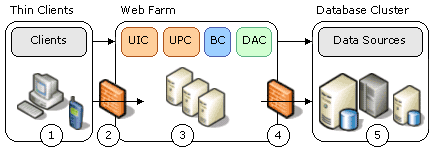
Notes:
- All application components are local to each other.
- Because DAC (Data Access Components) are also local, you can use DataReader
object for data rendering.
- This pattern provides the highest performance because all components are
local.

Note:
- All business components are on another farm that is accessed remotely by
ASP.NET pages.
- Performance is slower than the previous scenario.
- Improves reliability by isolating UI and business failure points.
- Scalability may be better where independent resource-intensive
operations are needed on both the Web Farm and the Application Farm.
Rich Client UI
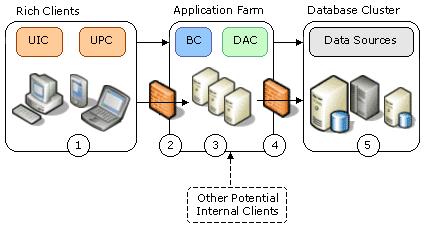
Notes:
- This is the most common deployment pattern for rich clients on an
intranet.
- Typically, firewall 2 and 4 are not needed.
- Having business components deployed in their own business farm allows
other clients (Web farm with
remote business logic) to share the deployment.
-
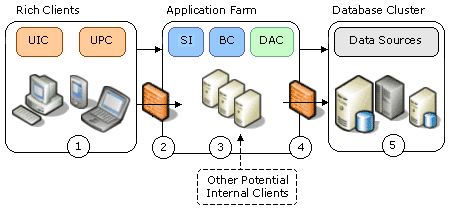
Notes:
- This deployment pattern is ideal if you want to provide rich client
functionality while accessing data and business logic over the Internet.
- This deployment pattern exposes data and business logic via a service
interface.
- Rich clients can invoke this service interface via Web Services proxies
that Visual Studio.NET generates.
- Take extra care in the areas of authentication, authorization, and secure
communication.
Service Integration

Notes:
- Deploying service interfaces (such as Web Services) and service agents
(components that may connect with Web Services) with business logic is very
similar to deploying ASP.NET UI and business logic together.

Notes:
- Business components are separated from service interfaces and service
agents.
- This pattern is used to separate tiers that are exposed to the Internet
(either by receiving or making calls) from the farms hosting business logic.
- You can deploy data access components in the Web Farm to take advantage of
DataReaders to render data for Web Service
calls.

Notes:
- Approach EAI infrastructure components separately from the infrastructure
that host application components.
- The EAI will probably host business workflows that use business components
to implement steps in the business process.
- These components can be hosted locally or remotely from the cluster
running the business workflows. There are three options:
- Host business components locally in the EAI cluster if the EAI cluster
can access the database and if the components will only be used in the
context of the business workflow running on this EAI cluster
- You could access the business components via Remoting/DCOM/Web
Services in the application farm where they are deployed.
- You could deploy assemblies for business components on both the
application farm and the EAI cluster, with the associated management
cost of having the same assembly in two separate locations.
As particular scenarios may vary, the examples given above can be combined to
produce a hybrid infrastructure for a layered application. The important thing
is to follow the conceptual model given previously and to understand the
application, infrastructure design, and how they affect each other in the
application lifecycle.
- Deploying .NET Applications: Lifecycle Guide.
- Team Development with Visual Studio.NET and Visual Source Safe.