Caching is a programming technique to keep frequently used data in memory for quick access. Let's say you have a database table with 20,000 products. Instead of fetching each product as the user requests it , you could retrieve all these products, cash them in memory, and then display individual products when requested. While this scheme can be further refined, it already improves performance by not having to visit the database for each product query.
Within ASP.NET caching allows you to use a number of techniques to store page output or application data across HTTP requests and reuse it. Therefore, the server does not have to recreate information, saving time and resources.
ASP.NET provides two types of caching: Page Output Caching and Application Data Caching. Page Output Caching allows you to store dynamic pages and user control responses from the originating server. On subsequent requests, the page or user control code is not executed, instead the cached output is used to satisfy the request. Application Data Caching is the usual caching of parameters where you keep variables in server memory, say a DataSet, so that the application can save time instead of having to populate it again.
Page output caching is the easiest way to start taking advantage of caching in ASP.NET. By default, page output caching is enabled but you must add code to have it applied to a particular Web page or user control. This involves specifying the following:
For the following code, when the page is first requested, a cache entry is made on the response for that document. All subsequent requests for that page will be served to the requester from the cache until the cache expires (as set in OutputCache directive). When the expiration time passes, the page will be removed from the cache. The page will be recompiled and cached on the next request. Note that all POST requests that serve dynamic data dependent on the POST must be generated explicitly and cannot be requested from the cache.
Dynamic, data driven pages often vary from one request to another based on the query string values. Using the OutputCache VaryByParam attribute, you can create multiple representations of the same page based on parameters passed to the page. That is, for each set of parameters, a representation of the page will be cached based on those parameters. When a page with a given set of parameters is requested, ASP.NET checks if there was a cached page for those parameters, and serves that page from the cache rather than recompile the page. The following shows a very basic example where the time is cached for 20 seconds, which means that if you refresh the page in under 20 seconds, you will always get the cached values. After 20 seconds, a new value will be displayed. Also note that that there will be only one form of representation of this page in cache because VaryByParam is none.
<%@ Page language="c#" Codebehind="default.aspx.cs" AutoEventWireup="false" Inherits="Caching.WebForm1" %>
<%@ OutputCache Duration="20" VaryByParam="none"%>
<!DOCTYPE HTML PUBLIC "-//W3C//DTD HTML 4.0 Transitional//EN" >
<HTML>
...
<body MS_POSITIONING="GridLayout">
<form id="Form1" method="post" runat="server">
<asp:Label id="Label1"
runat="server" Width="411px">Label</asp:Label>
</form>
</body>
</HTML>
public class WebForm1 : System.Web.UI.Page
{
protected System.Web.UI.WebControls.Label Label1;
private void Page_Load(object sender, System.EventArgs e)
{
Label1.Text = "Time now: " + DateTime.Now.ToString();
Response.Cache.SetCacheability( HttpCacheability.Public );
}
#region Web Form Designer generated code
...
#endregion
}
There are two ways to implement page output caching:
The following sections go over the attributes of the OutputCache directive:
The VaryByParam attribute is used to selectively cache multiple representations of a page based on the query string GET parameters values and from POST parameter values. A typical usage of VaryByParam is in dynamically driven data pages. For example, the MemberID key can be used to cache a representation of the user's personal details. Only when the user updates his/her personal details does the cache expire so that a new and updated representation of the user personal details is served next time. The VaryByParam is used as follows:
<!-- To cache a representation
based on a set of pre-selected keys -->
<%@ OutputCache Duration="seconds" VaryByParam="Key1; Key2,
... " />
<!-- To cache a representation
for each possible set of keys -->
<%@ OutputCache Duration="seconds" VaryByParam="*"
/>
<!-- To cache only one
representation of the page regardless of what parameters were passed -->
<%@ OutputCache Duration="seconds" VaryByParam="none
" />
The following demonstrates how to use the VaryByParam attribute. It also demonstrates how adding/removing a key affects how a document is cached. To illustrate, four different URLs are used:
A) http://www.diranieh.com/default.aspx?Key1=Value1&Key2=Value2
B) http://www.diranieh.com/default.aspx?Key2=Value2&Key1=Value2
C) http://www.diranieh.com/default.aspx?Key2=Value2&Key4=Value4
D) http://www.diranieh.com/default.aspx?Key3=Value3
| VaryByParam setting | URLs Cached | Note |
| VaryByParam="*" | 4 URLs: A, B, C, and D | Specifying '*' means cache all URLs. |
| VaryByParam="Key1" | 2 URLs: A, B | Key1 is present in URLs A and B. If the value of Key1 was the same, a single cache will be created for both URLs, but because the value of Key1 is different in both, two cache representations will be created. |
| VaryByParam="Key2" | 1 URL: The first requested of A, B, or C | Key 2 is located in A, B, and C, and the value of Key2 is the same in all three URLs. Hence, the first requested URL of A, B, or C will be cached only. |
| VaryByParam="Key2;Key1" | 2 URLs: A and B. | Only URLs A and B both have Key1 and Key2. |
| VaryByParam="Key3" | D | D is the only URL containing Key3. |
The Location attribute allows you to control whether the client receives the cached document from the client-side cache (if available), or form the server-side cache
<%@ OutputCache Duration="seconds" Location="value" %>
The Location attribute can have five possible values:
This attribute allows to specify custom strings to represent custom output caching requirements. If this attribute is given a value of browser, a new cache is created for each type of browser that requests the document. For example, if you request the same page with two different browsers IE 5.0 and IE5.5, two caches will be created, one for each version of the browser.
The second value that can be applied to the VaryByCustom attribute is any custom string value, which by itself has no meaning to the ASP.NET runtime engine.
<%@ OutputCache Duration="seconds" VaryByCustom="SomeValue" %>
To provide a meaning for the custom string, you must override HttpApplication.GetVaryByCustomStirng method in the application's globals.asax file. The following example shows how we can define our custom attribute which checks the CLR version so that a specific action may be taken based on the current CLR version:
<%@ Page language="c#" Codebehind="VaryByCustom.aspx.cs" AutoEventWireup="false" Inherits="Caching.VaryByCustom" %>
<%@ OutputCache Duration="10" VaryByParam="none" VaryByCustom="CLRVersion"
%>
<html>
<body MS_POSITIONING="GridLayout">
<form id="VaryByCustom" method="post" runat="server">
</form>
</body>
</html>
using System;
...
public class Global : System.Web.HttpApplication
{
...
public override string GetVaryByCustomString(HttpContext ctx, string str )
{
string strRet = "";
if (str == "CLRVersion" )
{
return strRet = str + ctx.Request.Browser.ClrVersion;
}
return strRet;
}
...
}
The VaryByHeader attribute allows you to control caching based on HTTP headers. It is used as follows:
<%@ OutputCache Duration="10" VaryByParam="none" VaryByHeader="semi-colon separated list" %>
The VaryByHeader attribute gives you precise control for caching based on client and server data. HTTP headers can include: Accept, Authorization, Content-Encoding, and many others.
ASP.NET offers the option to cache regions or portions of a Web Form. You use this technique to gain better control or better granularity over the items that should be cached when a Web Form is cached. Fragment caching allows you to cache only the user controls you are interested in caching, while leaving all others to be generated on each request.
The basic approach is simple: Create a user control and specify the appropriate caching attributes (using one of the attributes specified above), then include that user control in you Web Form. Repeat this process for each user control that you want to cache. The following example illustrates how a user control caches its own time while the page does not and hence always reports the current time:
<!-- User Control with caching
-->
<%@ Control Language="c#" AutoEventWireup="false" Codebehind="PartialCaching_UserControl1.ascx.cs"
Inherits="Caching.PartialCaching_UserControl1" TargetSchema="http://schemas.microsoft.com/intellisense/ie5"%>
<%@ OutputCache Duration="20" VaryByParam="none"%>
Time from user control: <%= DateTime.Now.ToString() %>
<!-- Web Form containing a user
control with caching-->
<%@ Page language="c#" Codebehind="PartialCaching_WebForm.aspx.cs" AutoEventWireup="false" Inherits="Caching.PartialCaching_WebForm" %>
<%@ Register TagPrefix="uc1" TagName="PartialCaching_UserControl1" Src="PartialCaching_UserControl1.ascx" %>
<HTML>
<HEAD>
...
</HEAD>
<body MS_POSITIONING="GridLayout">
<form id="PartialCaching_WebForm" method="post" runat="server">
<uc1:PartialCaching_UserControl1 id="PartialCaching_UserControl11" runat="server"></uc1:PartialCaching_UserControl1>
<br><b>Time from main Web page: <%= DateTime.Now.ToString() %></b>
</form>
</body>
</HTML>
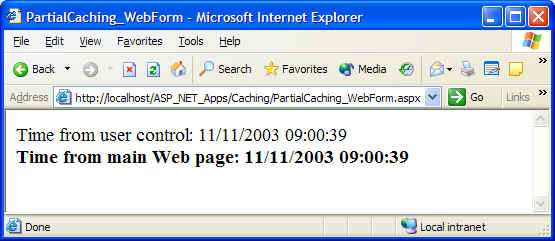
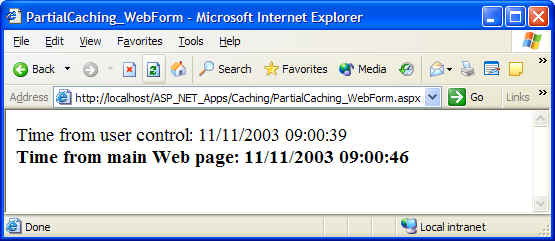
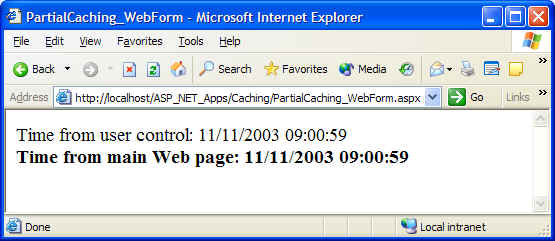
The first figure is the starting screen. The second figure is refreshed before the user control cache expires - note how both cache and Web Form report two different times. The last figure was obtained when the Web Form was refreshed after the user control cache expired - hence both the Web Form and the user control both display the same time.
The power of fragment caching (or caching protions of a Web Form) comes when you have more than one user control on your Web Form. Assume a page in an e-commerce site wants to display product categories, but these categories change only once per day. You can use fragment caching on a Web Form by having a data grid user control to display those categories where the data grid user control is configured so that its cache expires at 12:00 midnight each day. This obviously improves performance where users query the categories only once. Subsequent requests will use the cached data grid user control to display categories.
Note: If both the Web Form and one or more of its user controls enable caching, be aware of the situation where the cache duration of the Web Form exceeds that of the user control. This means that the user control will not refresh until the Web Form cache duration expires.
The VaryByControl attribute allows you to have multiple representations of a user control based on one or more of its properties (in C#. a property is declared using the set/get keywords). These properties are either properties that are set by users of the control, or they can be varied programmatically via some query.
As mentioned previously, you have the option of enabling caching in you Web Forms by either using the OutputCache directive or the HttpCachePolicy class. Using the HttpCachePolicy class rather than the OutputCache directive gives you greater control over how and when a page is cached. The HttpCachePolicy class has all the methods and properties necessary for controlling the output cache in ASP.NET Web Forms and user controls. This section discusses how to use this class in Web Forms to set the output cache for the page.
Note that the following two code fragments are equivalent:
<%@ OutputCache Duration="20" VAryByParam="none"%>
public void Page_Load(Object o, EventArgs e)
{
Response.Cache.SetExpires(
DateTime.Now.AddSeconds(20) );
Response.Cache.SetCacheability( HttpCacheability.Public );
...
}
The following list contains the most important members of the HttpCachePolicy class that you'll use to enable caching:
To programmatically simulate the effect of VaryByParam and VaryByHeader attributes, you must use their respective classes, HttpCacheVaryByHeader, and HttpCacheVAryByParams.
The System.Web.Caching.Cache class allows you to implement application-wide caching of data objects rather than page-wide as with OutputCache directive or the HttpCachePolicy class. The Caching.Cache class is ideal for sharing cached objects (datasets, XML files, arrays, etc.) across the application. Note that only one instance of Cache object is created per application domain, and it remains valid as long as the application domain remains active.
The following sections discuss the major functions used to programmatically implement caching.
This method is used to insert an item into the application-wise cache object. This method has many overloads that allow you to control various aspects of object caching. For example, one of the overloads allow you to specify a cache dependency where you cache an item that has a file or key dependency. As an example of using this cache dependency, you can create a DataSet object based on an XML file and then cache the DataSet object. However, because the DataSet object is dependent on the XML file (the source file), we can use an overload of the Insert method that allows us to specify the XML file as cache dependency, such that if the XML file changes, the cached DataSet object is taken out from the cache.
using System;
...
public class CacheMethods : System.Web.UI.Page
{
protected System.Web.UI.WebControls.Label lblTitle;
protected System.Web.UI.WebControls.ListBox lbCacheItems;
/* This function caches an array list of IDs if the cache was not found and
then binds it to a list box */
private void Page_Load(object sender, System.EventArgs e)
{
// Attempt to get the cached arraylist
lblTitle.Text = "Retrieving cached items";
object obUserID = this.Cache.Get( "UserIDs");
if (obUserID == null)
{
// Cached item does not exist. Create it and populate it
ArrayList alUserID = new ArrayList();
alUserID.Add( "a_smith" );
alUserID.Add( "b_jones" );
alUserID.Add( "c_fisher" );
alUserID.Add( "d_brown" );
alUserID.Add( "c_johnson" );
lblTitle.Text = "Cached Items have been created";
// Then insert item into cache
this.Cache.Insert( "UserIDs", alUserID );
obUserID = alUserID;
}
// Now we have the cached items. Bind to the list box
lbCacheItems.DataSource = obUserID;
lbCacheItems.DataBind();
}
...
}
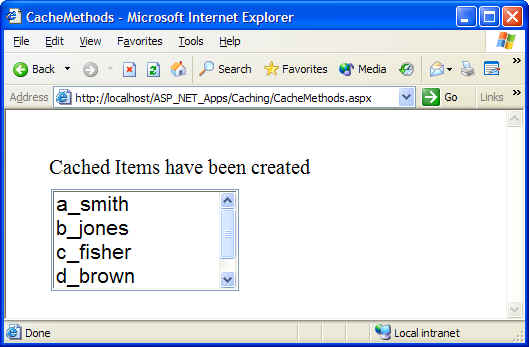
Output from the above code is displayed below. In the first figure, an array of user names was created and bound to the Listbox. The array was then cached. In The second figure, the page was refreshed and the array was retrieved from the cache in order to re-initialize the Listbox.
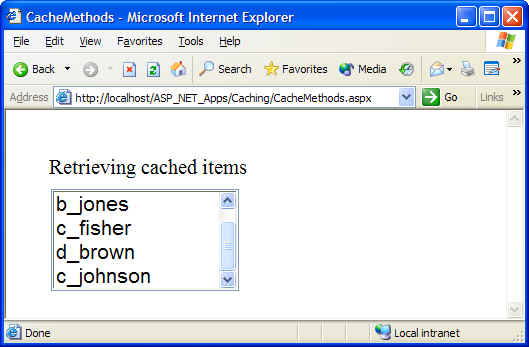
This method is used to remove objects from the application's Cache objects. In the example above, we could add another button called 'Refresh Data' such that when the button is refreshed, Cache.Remove() is called to remove the array of user names, re-initialize the array, and then re-populate the cache.
This method is used to retrieve a specific item from the application's cache. Note that you can retrieve a cache item in two ways:
object obCache = Cache[ "CacheName" ];
object obCache = Cache.Get( "CacheName" );
This method returns a dictionary enumerator (IEnumerator)that can be used to traverse the contents of the application-wide Cache object. In C#, this means that the Cache object can be used in a foreach loop. The following code is used to traverse the contents of the Cache object.
Response.Write( "Count: " + Cache.Count.ToString() + "<BR>");
foreach( object ob in Cache )
{
DictionaryEntry obDE = (DictionaryEntry)ob;
Response.Write ( "Key: " + obDE.Key.ToString() + " Value : " + obDE.Value.ToString() + "<BR>");
}
Note: Any collection that supports IEnumerable can be used in a foreach loop.
The following section presents two performance checklists for Web Forms and Database access from an ASP.NET application perspective: