
This chapter discusses dynamic data structures - data structures that grow and shrink in size at execution time. The following identify some of the data structures discussed in this chapter:
A self-referential class is one that contains a reference data member that refers to an object of the same type as the containing class. The following defines very primitive linked list called Node that contains two data members. One represents the actual data to be contained in this class, and the other represents the next Node object in the linked list:
public class Node
{
private int data; // The actual data item
private Node next; // The next node in the list
// Constructor
...
// Properties to access the data members
public int Data { get{ ... } set { ... } }
public Node Next
{
// A very simple and primitive implementation
get { return next; }
set { next = value; }
}
}
Self-referential objects can be linked together in various ways to form useful data structures likes queues, lists, trees, stacks and others. The following shows self-referential elements linked together to form a linked list. Note how the last element points to null to indicate that it is the last element.
Creating and maintaining data structures requires dynamic memory allocation, the ability to obtain more memory space at runtime to allocate more elements, as well as the ability to free space when elements are removed. .NET types are managed and hence are garbage collected. The managed operator new is central to creating and maintaining data structures .
The following sections discuss lists, stacks, queues and trees. These data structures are created and maintained with dynamic memory allocation and self-referential classes. And as a good programming tip, if your data structures will be used to allocate very large data structures, then make sure to always catch any potential OutOfMemoryException exceptions.
A linked list is a linear collection of self-referential objects called nodes connected to each to each other sequentially by reference links, i.e., a node points to the node after it, and so on. See the previous figure. A program accesses a linked list via a reference to the first element in the list, Each subsequent node is accessed via the link-reference member stored in the current node. The last node, by convention, has a link reference set to null (assuming C#). Data is stored in a linked list dynamically. That is, each node is created as required. A node can contain data of any type including objects of other classes.
Note that lists of data can be stored in arrays, but linked lists provide many advantages.:
However, note that access to elements within an array is faster because data is stored in contiguous memory and the location of any element can be calculated directly by its offset from the beginning. Linked lists cannot afford immediate access; you have to traverse the list from the beginning in order to access the nth element because linked lists are almost never stored in contiguous memory.
The List example illustrates how to implement a very simple linked list with a minimal number of functions to manipulate the list
A stack is a variation of a linked list - it takes and releases new nodes from the top only. The stack is often referred to as Last-In-First-Out (LIFO). The primary operations to operate on a stack are push and pop. Push adds a new item to the top of the stack, and Pop removes the item at the top of the stack.
System.Collections namespace contains a class called Stack used to implement stacks that can grow and shrink during program execution. However, this section will show how to implement stack using the List class developed earlier - List . Reusing the List class, a stack can be implemented in two different ways: A stack can be implemented through inheritance (inheriting from the List class) or through containment (by containing an instance of the List class).
The Stack example illustrates how the a linked list can be used to implement a stack using either inheritance or containment.
A queue is similar to a checkout line in a supermarket. The first person to enter the queue is the first to be served, and the last person to enter the queue is the last to be served. Applying this analogy to the queue data structure, data can only be inserted at the tail of the data structures and can only be removed from the head of the data structure. For this reason, a queue is known as FIFO (First-In First-Out). Insert and remove operations are known as enqueue and dequeue.
Queues are used quite often in computer systems and applications; print jobs sent to a print server are placed in a queue, information packets arriving from the network are also placed in a queue, and so on.
The Queue example illustrates how the a linked list can be used to implement a queue using inheritance.
Linked lists, stacks, and queues are linear data structures. Trees are non-linear two-dimensional data structures with specific properties. Unlike linear data structure, a tree node contains two or more links. This section describes binary trees - trees whose nodes all contains two links (none, one, or both of which may be null). Note the following criteria of binary trees:
Binary trees have many uses. For example, a binary tree is used to evaluate binary expressions such as (A x B) + (C - 5) + 5. A binary tree is also used to implement a search tree - a mechanism to quickly search for values. In specific, a search tree has the characteristic that the values in any left sub-tree are less than the value of the sub-tree's parent node, and the values in any right sub-tree are greater than the value of the sub-tree's parent node. The following figure illustrates a binary search tree:
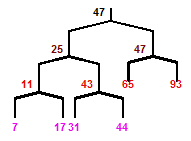

Similar to the data structures discussed previously, a tree can generally be implemented with two classes - one class implements a tree node, TreeNode, and another creates and manipulates the tree structure, Tree:
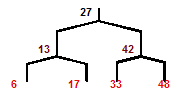
Searching a binary tree is fast: If the tree has n elements, then it will have a minimum of log2n levels. Thus, at most, log2n comparisons are needed to find a match or determine that a match does not exist. Example IntegerBinarySearchTree creates a binary search tree of integer values and traverses the tree using the afore-mentioned tree traversal methods. Output is shown below and corresponding tree are shown below:
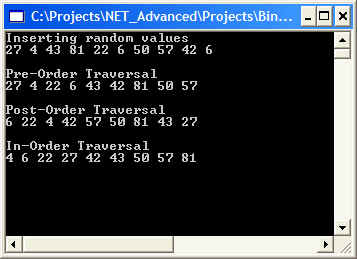
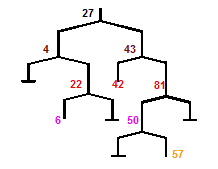
The previous example works nicely when all data types are integers. If you wanted to manipulate a tree of strings, you will have to write the same code for that tree but with a data type of String. Obviously, this proliferation of code is not acceptable and will be soon become difficult to code and maintain. If we were using C++, templates would be the definite answer, where we would write a templated class once and then have the compiler generate new versions of the class for each data type we choose.
Ideally, then, we want to define the functionality of a binary tree only once and use that implementation for all kinds of data. C# provides polymorphic capabilities that enable all objects to be manipulated in a uniform manner. In the next example, the polymorphic capabilities of C# are used to implement a tree that manipulates objects of any type as long as they implement the IComparable interface. Implementing the IComparable interface is very important because we want the ability to compare objects in a binary search tree so we can determine where to insert new nodes.
Classes the implement the IComparable interface must implement the interface's CompareTo method. This method compares the object that invoked the operation with the object that was received as the method's argument. Note that both objects must be of the same type, else an ArgumentException exception is thrown.
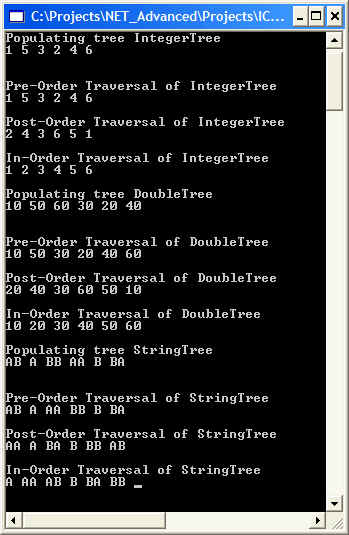
IComparableBinarySearchTree re-implements IntegerBinarySearchTree to create a binary search tree capable of holding any data type (as long as it supports IComparable) and traverses the tree using the afore-mentioned tree traversal methods. Output is shown below:
The previous sections discussed in low-level detail how to create and manipulate data structures. This section considers the pre-packaged data structures that .NET Framework offers. These pre-packaged data structures are collectively known as collection classes - they store collections of data. An instance of one of these collection classes is known as a collection - i.e., a collection of data items.
With these collection classes, you do not have to worry about implementation details. You just use them to store and manipulate your data items. The .NET Framework System.Collections namespace provides several collection classes such as Array, ArrayList, Stack, HashTable, BitArray, Queue, SortedList and others. The following sections discuss some of these collection classes.
In the .NET world, all array inherit from the System.Array class. This class provides several static methods that provide algorithms for processing arrays. Typically, class System.Array overloads these methods to provide multiple options for performing these algorithms. For example, Array.Reverse method can reverse the order of all the elements in an array or, in a different overloaded version, it can reverse a specified range of elements in an array.
The Array example illustrates some the basic concepts of the System.Array class.
Conventional arrays suffer from the problem of having a fixed size - they cannot be changed dynamically to reflect an application's execution-time memory requirements. If you need your array to grow bigger, you will have to create another array with the right size and copy the contents of the old array to the new array. ArrayList can contain element whose base type is Object.
The .NET Framework class ArrayList mimics the functionality of the conventional array and provides dynamic resizing of the collection through the class's methods. At any one time, an ArrayList instance contains a certain number of elements that is less or equal to its capacity - the number of elements currently reserved for the ArrayList. This capacity can be manipulated through the Capacity property of the ArrayList class. If an ArrayList needs to grow, by default, it will double its capacity.
From a performance perspective, inserting elements into an ArrayList whose current size is less than its capacity, is a fast operation (just like for linked lists). However, it is a slow operation if you need to insert an additional element that will cause the ArrayList to grow in order to accommodate that new element. If storage is very limited, the method TrimToSize allows you to trim an ArrayList to its exact size. Note that TrimToSize will leave no extra room for the ArrayList to grow, so inserting new items after trimming will be a slow process.
The ArrayList example illustrates some the basic concepts of the System.Array class.
The Stack class impalements a stack data structure. As one would expect, it has the Push and Pop methods to perform the basic stack operations.
The Stack example illustrates some the basic concepts of the System.Collections.Stack class.
Note in the above example how Stack.Clone works: Stack.Clone creates a shallow copy of the source stack. A shallow copy of a collection in .NET Framework copies only the elements of the collection, whether they are reference types or value types, but it does not copy the objects that the references refer to. The references in the new collection point to the same objects that the references in the original collection point to. Compare this to a deep copy of a collection which copies the elements and everything directly or indirectly referenced by the elements.
Consider this situation: In the US, people are identified by their Social Security Number (SSN) which is a nine-digit number - nnn-nnn-nnn. If a company had 100 employees and you wanted to use an array to store and manage your employee name by using their SSN, you would have to create an array of 999,999,999. Obviously this is impractical and a waste of memory. This is a very common problem where the key (index) is either of the wrong type (non-integer) or it is very sparsely spread of a very huge range.
What is needed is a scheme to convert those indexes into unique array subscripts. So when an application needs to store something, it rapidly converts the key (SSN number in the example above) into a subscript and information (Name in the above example) is stored in that location. Retrieval occurs in the same way - the application rapidly converts the key (SSN number in the example above) into a subscript and information (Name in the above example) is retrieved from that location.
The scheme described above is commonly known as hashing. When a key is hashed into an array subscript, the resulting number has no significance beyond its usefulness in storing and retrieving a particular data record. A hash function is the function that performs the calculation to determine where to place data in a hash table. The hash function is applied to the key in a key/value pair of objects.
The .NET Framework provides the Hashtable class and some related features to enable programmers to take advantage of this data structure without having to implement it. Class Hashtable can accept any object as a key. For this reason, class Object defines a method called GetHashCode(), which all objects in C# inherit. Most classes that are candidates to be used as a key in a hash table override this method to provide their own efficient hashcode implementation. For example, string class has a hashcode calculation that is based on the contents of the string itself.
The HashTable example illustrates some the basic concepts of the System.Collections.HashTable class.