What problems do Web Services solve? What is the need in the market place for this technology?
In the past, the lack of a standard communication infrastructure was a barrier to organizations exchanging data with other organizations. It was difficult to achieve a high degree of electronic interaction and integration because of the number of different hardware and software platforms, the lack of protocols, and the ever-expanding number of proprietary data stores. Currently, the following trends are taking shape
The basic idea is that companies can rely on each other as partners to promote and sell each other's products and services to their existing client bases.
The basic idea is that companies outsource business processes that are not in the organization's core competencies. For example, a company might rely on one vendor to take orders, another vendor to manage inventory, and yet another vendor to make sure that products are delivered. In these instances the value chain is virtual: Customer and product data must be exchanged between many different companies to get the product or services from the order to the delivery.
The following takes a look at some of the more popular methods of exchanging data in the IT world from two perspectives: how companies format data they want to exchange, and how they transmit that data.
The following two sections are two examples of how the IT world typically formats data and why these formats pose a problem:
There is no standard way to describe the files or to describe the values in the file. The implementation is up to each business party. Parties exchanging data in ASCII format must work closely to agree on a common format and to build a custom loading software to handle each other's file format. Also, ASCII data do not describe relational or hierarchical data very well.
Two companies can exchange data via a specified data format such as Microsoft Excel or Access files, or some other proprietary format. However, this solution does not scale well and requires a great deal of customization to create "bridging software" when you want to bring a new business partner who does not accept your file format.
The following sections give some examples of how companies attempt to transmit their data and the problems encountered doing so:
Somebody copies the data or software into a diskette and the data or software gets mailed over to the other company. Obviously this approach takes time.
This method is popular but not a highly automated solution. This solution depends on files being sent, which is not a dynamic way to exchange data. Custom code must be written by each trading partner to understand the process of the data being received. Ultimately, FTP facilitates file transfer, but sending files is not the right object-oriented approach to exchanging data.
EDI is a proven solution, but is rigid and complex. It is also expensive to implement, maintain, and deploy.
These technologies allow remote RPC calls using an object-oriented approach to exchange information. These technologies were an improvement over EDI but they had their own set of problems:
Current e-business trends require integrating disparate distributed systems, and although some technologies do address some of these requirements, they are inappropriate, difficult, expensive, inflexible, or non-standard.
Therefore, what is needed is a technology that can be integrated across many platforms, can interface easily with legacy systems, and does not pose network security risks.
Additionally, it would be advantageous if the technology:
Definition: A Web Service is a unit of managed code typically run under IIS that can be remotely invoked using HTTP.
Historically, remote access to binary units required platform-specific code. A class example is DCOM where remote clients access COM components using tightly coupled RPC calls. The same applies to CORBA. The problem with these protocols is that they are platform-specific, which require a tight connection to the remote source. However, using a .NET-aware language with Web Services allows you to access language-neutral assemblies using nothing more than HTTP.
Note the following issues regarding Web Services:
What is needed is a way to transfer information across platform and company boundaries to provide services to any other business on the Internet.
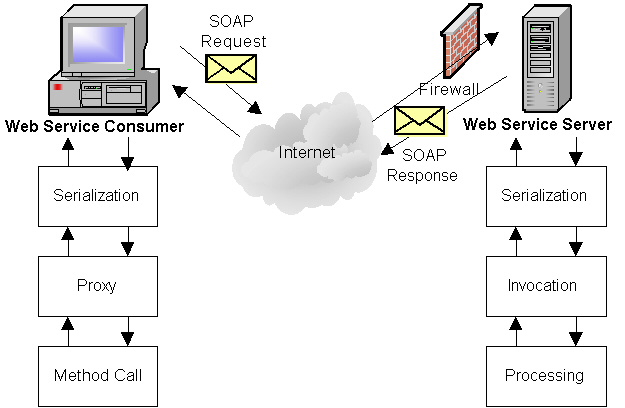
Simple Object Access Protocol (SOAP) is a specification that defines how messages can be sent between two software systems using through the use of XML. These messages typically follow a pattern of Request and Response. One computer makes a method call and the other performs the requested operation and then returns a result to the calling application:
SOAP has tremendous advantages over other protocols:
SOAP is a specification that defines the structure of an XML message that can be sent over the network to call and return results from a remote application. Web Service is the term used to describe a remote application that makes SOAP (or other types of calls) available.
Note that Web Services are not exclusive to Microsoft! Web Services can be created by any software or OS vendor and do not necessarily have to use SOAP to send messages. However, so far SOAP and Web Services are used almost synonymously. Microsoft calls its implementation of Web Services ASP.NET Web Services.
Similar to a C++ or C# class, Web Service Description Language (WSDL) is an XML document that describes the programmatic interfaces of a given Web Service. Specifically, WSDL is a block of XML that fully describe how external clients can interact with the Web Services on a given machine, the methods they support, and the syntax of the various wire protocols (GET, POST, and SOAP). By looking at the WSDL document, you can figure out all the methods that are made available by the Web Service. Note that WSDL also defines each method's signature (parameters and return values).
Therefore, by using a WSDL, you learn how to call and use the Web Service. But how do you find out what Web Services are available in the first place? There are two pieces to this puzzle - DISCO and UDDI.
DISCO, an abbreviation for DISCOvery of Web Service, is a specification created to help developers discover what Web Services are available on a given server. A DISCO file contains the URI of each Web Service available on that machine. The URI typically points to the WSDL document which then points to the actual Web Service.
UDDI, Universal Description, Discovery, and Integration, can be thought of as the search engine for Web Services. It is a specification that defines how a business directory can be created that holds a series of references to companies that offer Web Services online. It also stores additional information about the company offering Web Services such as its business categorization, geographical location, and so forth.
The idea behind UDDI is that it is a meeting place for companies looking for goods and services and those supplying the goods and services. It is also a place where both parties can conduct business electronically.
The following figure illustrates the relationships between a Web Service and the companion technologies discussed previously:

Web Services are called and the results are returned via SOAP. For a potential business partner to learn of a company's Web Service offerings, it must know that company, its server location, and the URI to its WSDL or DISCO file, or find the company on a UDDI search engine. After the company has been located, the business partner can develop software to consume the company's Web Service(s).
Remoting allows components to reference each other across applications boundaries, whether they run across contexts and AppDomains, across servers, or across the world. It accomplishes this by using hidden proxies that act as the real interface for the object. The proxy resides inside the context of the calling application and is responsible for accepting the call to that object, serializing the method call and sending it to the appropriate URI. It then accepts the values returned from the object and delivers them to the calling application.
.NET Remoting has multiple extensibility points that allow developers to hook into and intercept messages sent at various times through the proxies to the remoted object.
.NET Remoting uses SOAP as the means to serialize method calls and return values. However, applications using .NET Remoting require that both client and remote server be built on top of the .NET framework. The purpose, then, for a remote application is different than for a Web Service: .NET Remoting accommodates the need for objects to be distributed when using the same platform. This purpose limits the ability of the system to be open to all platforms. Nonetheless, .NET Remoting is very powerful when you need the availability and load balancing of a distributed application.
ASP.NET Web Services allow developers to easily develop SOAP-based applications that are created in the spirit of ASP applications. Unlike .NET Remoting, ASP.NET Web Services do not require a great deal of understanding how they work to effectively create them. Unlike traditional ASP applications, ASP.NET Web Services do not have a visual element associated with them. Instead, they return XML that is formatted to comply with the SOAP specification.
The .NET framework and Visual Studio hide the complexity of creating Web Services from the developer. The developer then concentrates on the business rules instead of the technical details of sending and receiving SOAP messages.
Web Services are easy to test using the built-in test harness. This test harness is known as the Web Service test page or the WSDLHelpGenerator.aspx, and it allows you to actually call the Web Service and see the result.
Utilities and configuration mechanisms such as the Web config file make deployment of Web Services much less complex. Because registration of components is not required, you simply copy files into your application's directory and they automatically registered and ready for use. Applications can use the web.config file to transition a Web Service from development and staging to production environments. VisualStudio.NET has tools that make this process even easier.
Web Services are typically hosted by IIS under a unique virtual directory. In addition to managed code the constitutes its functionality, Web Services require some supporting infrastructure:
ASP.NET is the next generation of ASP. ASP.NET sits on top of the .NET framework, and as a result, benefits from significant performance, security, and deployment environments:
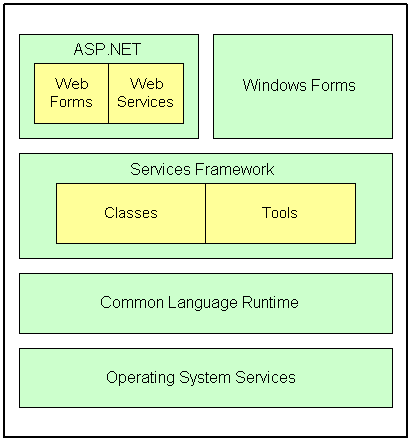
Note that ASP.NET is not ASP 4!. You cannot use VBScript to create ASP.NET Web pages. You must use a language supported by the .NET Framework such as VB.NET, C#. Managed C++ or JScript.NET because the Web page is compiled into a DLL. This DLL is not an ActiveX or COM DLL, rather, it's an IL DLL file that runs exclusively on top of the CLR (an environment that host the IL and provides many system services to the application.)
ASP.NET allows you to create ASP.NET Web Services using VB.NET, Managed C++, and C#. Of these languages, VB.NET and C# will be the most popular because of their simplicity compared to C++.