A processing directive is a line in code that tell the .NET Framework the following:
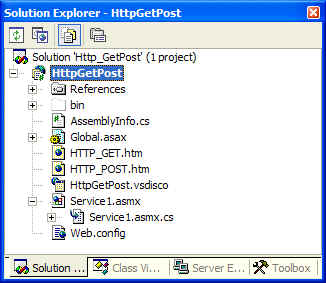
For example, when you create a new Web Service called Service1, two specific files are added: Service1.asmx and Service1.asmx.cs (or Service1.asmx.vb if you're using VB.NET). This is shown below:
The primary .asmx file is what gets called in the Web Service, and based on the information in its processing directive, it points to a Code Behind file that the contains the actual implementation of the Web Service methods. For example, the following listing represents the processing directives which were obtained by opening the .asmx file of the Service1 Web Service in Notepad:
<%@ WebService Language="c#" Codebehind="Main.asmx.cs" Class="WS_Exceptions.Service1" %>
The concept of the Code Behind file has a clearer function in ASP.NET Web Forms than in ASP.NET Web Services. In a Web Form, it enables you to separate the HTML and other graphical elements that compose a Web Form from the server-side events that take place when a user interacts with a Web Form. Code Behind files allows a clearer separation of functionality, with one file handling only visual elements and the other file handling server-side logic to create dynamic pages. Compare this to classis ASP files where HTML code was intermixed with server-side scripts placed between <%= and %> tags.
On the Web Services side, the use of the Code Behind has less obvious advantages. The Code Behind makes it easier to drag and drop references to resources from Solution Explorer into the designer surface.
The following table explains the properties found in the processing directive listed previously:
| Property | Meaning |
| Language | The Language property in the processing directive shown previously can be set to any supported .NET language (not just C# or VB). This property tells the HTTP handler which language the .asmx is using so that it can call the appropriate parser. |
| Codebehind | This property points to the file that contains the Code Behind implementation. |
| Class | This property defines for the ASP.NET Web Service execution engine which classes in the .asmx file should be made available at the URI. The .asmx file can have multiple classes defined in it, but only one of those classes can be made available as a Web Service (the one marked with the Class property at the top of the .asmx file). In that designated class, you can have one or more methods that are "Web Methods" via the [WebMethod] attribute. Note that the methods in the designated classes are the only ones allowed to have this attribute. |
An attribute is a keyword that defines the behavior of a class or its members. Attributes can be created for use in classes, methods, interfaces, assemblies, and a number of other items as defined in the AttributeTargets enumeration. You can use attributes to provide extra information about a specific code element. For example, the [WebMethod] attribute (explained in the next section) tells the code responsible for running your Web Service which functions in the file should be made available as web services. You can even create your own attributes for your application to read and interpret.
Note that within the Code Behind file itself, the class designated in the processing directive section of the .asmx file is the class exposed publicly as a Web Service. You can adorn that class with the [WebService] attribute to assign it a namespace (currently it defaults to http://tempuri.org), and to give the class a text description. The properties of the [WebService] attribute are separated by a comma:
[WebService(Namespace="...", Description="...", Name="...")]
The following explain the purpose of each of the above three properties
In general, the Namespace property addresses the potential problem of ambiguity between two or more XML documents (from different sources) that happen to use the same names to define different elements. By default, ASP.NET Web Services use a temporary namespace of http://tempuri.org, and it is highly recommended to change it to your own URI.
A descriptive message is displayed to prospective consumers of the Web Service when description documents (WSDL documents) for the Web Service are generated.
Setting the Name property changes the name of the Web Service in the WSDL from the class name to another name you chose. This property affects two aspects of the Web Service.
The [WebMethod] attributes designates a method that it is accessible via the Web Service. Private methods and private classes cannot be Web Methods or Web Services. You can have multiple Web Methods inside a single Web Service, however, a single Code Behind file cannot have multiple classes that are Web Services because the .asmx file's Web Service processing directive can designate only one class as a Web Service. The properties described below allow you to extend the function and utility of their web methods
This property enables buffering of responses for a Web Service method. By default, ASP.NET buffers the entire response before sending it to the client. An efficient buffering mechanism helps improve performance by minimizing communication between the worker process responsible for generating information and the IIS process responsible for sending the information.
So why would you want to set this property to false? Consider the fact that you may not want the response's entire contents in memory at once if you are sending back a large ADO.NET Dataset to the consumer. When BufferResponse property is set to false, ASP.NET buffers the response in chunks of 16KB and reduces the amount of memory consumed in this process:
[WebMethod(BufferResponse=true)]
public long MyMethod() { ... }
CacheDuration property enables caching the results for a Web Service method. Caching is a great feature to use - when it makes sense! ASP.NET caches the results for each unique parameter set. For example, if the Web Service returns a DataSet based on the ID of a given record in the database, you could save the roundtrip for querying the data source from the Web Service server by turning caching on. The value of the CacheDuration property defines how many seconds ASP.NET should cache the results. The default value is zero which means that no results are cached.
The Description property sets the WSDL's description property for the method
EnableSession property enables session state for a Web Service method. If this property is set to true, the Web Service can access the session state collection directly from HttpContext.Current.Session or with the WebService.Session property. By default, this property is false.
This property allows you to overload methods in your class, but still allows them to be accessed uniquely as Web Services by supplying an alternative name (or alias) to each one. The WSDL and the SOAP messages refer to MessageName instead of the actual name of the method in your class. The following code illustrates the point:
public class Service1 : System.Web.Services.WebServicde
{
[WebMethod( MessageName="AppendTwoString2"
)]
public string AppendString( string strOne, string strTwo )
{
return strOne + strTwo
}
[WebMethod( MessageName="AppendThreeStrings"
)]
public string AppendString( string strOne, string strTwo, string strThree)
{
return strOne + strTwo + strThree;
}
}
This property enables the Web Method to participate as the root of a transaction. Note that a Web Service method can only have two possible transactional behaviors: it does not participate in a transaction (Disabled, NotSupported, Supported), or it creates a new transaction (Required, RequiresNew). Transactions are covered in more depth in Using Transactions in Web Services.