Hosting WCF in IIS
Summary
- WCF in IIS
- Example
WCF in IIS
IIS-hosted WCF services use the same configuration elements and syntax as WCF services hosted outside of IIS. Applications hosting WCF services outside of IIS can control the base address of the services they host by passing a set of base address URIs to the ServiceHost constructor or by providing a <host> element in the service’s configuration.
Services hosted in IIS do not have the ability to control their base address; the base address of an IIS-hosted service is the address of its .svc file. Therefore, endpoint addresses are always considered to be relative to the address of the .svc file that represents the service.
Available Transports
WCF services hosted in IIS 5.1 and IIS 6.0 are restricted to using HTTP-based communication. On these IIS platforms, configuring a hosted service to use a non-HTTP binding results in an error during service activation. For IIS 7, the supported transports include HTTP, Net.TCP, Net.Pipe, Net.MSMQ, and msmq.formatname for backwards compatibility with existing MSMQ applications.
Deploying Implementation Code
Implementation code for IIS-hosted WCF services can be deployed in several ways at various locations:
- As a precompiled DLL located in the GAC or in the application’s \bin directory. Precompiled binaries are not updated until a new version of the class library is deployed.
- As uncompiled source files located in the application’s \App_Code directory. Source files located in this directory are dynamically required when processing the application’s first request. Any changes to files in the \App_Code directory cause the entire application to be recycled and recompiled when the next request is received.
- As uncompiled code placed directly in the .svc file (as in the example above). Implementation code can also be located in-line in the service’s .svc file, after the @ServiceHost directive. Any changes to inline code cause the application to be recycled and recompiled when the next request is received.
WCF and ASP.NET
WCF services can be hosted either side-by-side with ASP.NET or in ASP.NET Compatibility Mode in which services can take full advantage of features provided by the ASP.NET Web application platform. See MSDN for more details.
Best Practices
- Implementing a WCF service as a DLL that is deployed to the \bin directory of a Web application allows you reuse the service outside of the Web application model (For example, in a test environment that may not have Internet Information Services (IIS) deployed
- Endpoints for an IIS-hosted service should be configured using relative URIs, not absolute addresses.
- Services hosted in IIS should store their state external to the process (For example, in a database) or in an in-memory cache that can easily be recreated if an application recycle event occurs.
Example
Service Code
Service code in this basic example consists of two files, the service.svc file and the web.config file. WCF services hosted in IIS are represented as special content files (.svc files) inside the IIS application. A .svc file contains a WCF-specific processing directive (@ServiceHost) that allows the WCF hosting infrastructure to activate hosted services in response to incoming messages. Note that IIS applications that host WCF services are not responsible for managing the creation and lifetime of ServiceHost instances. The managed WCF hosting infrastructure creates the necessary ServiceHost instance dynamically when the first request is received for the .svc file. The instance is not released until either it is closed explicitly by code or when the application is recycled.
The following shows content of the Service.svc file. Note that the service interface and implementation are part of the Service.svc file:
<%@ServiceHost
language=c# Debug="true" Service="Microsoft.ServiceModel.Samples.CalculatorService"
%>
using System;
using
System.ServiceModel;
namespace
Microsoft.ServiceModel.Samples
{
// Define a
service contract.
[ServiceContract(Namespace="http://Microsoft.ServiceModel.Samples")]
public
interface ICalculator
{
[OperationContract]
double Add(double n1, double n2);
[OperationContract]
double
Subtract(double n1, double n2);
[OperationContract]
double
Multiply(double n1, double n2);
[OperationContract]
double
Divide(double n1, double n2);
}
// Service
class which implements the service contract.
public class
CalculatorService : ICalculator
{
public
double Add(double n1, double n2)
{
return
n1 + n2;
}
public
double Subtract(double n1, double n2)
{
return
n1 - n2;
}
public
double Multiply(double n1, double n2)
{
return
n1 * n2;
}
public
double Divide(double n1, double n2) {
return
n1 / n2;
}
}
}
Web Config File
Note: WCF config files can be visually edited using svcconfigeditor tool
<?xml
version="1.0"
encoding="utf-8"
?>
<configuration>
<system.serviceModel>
<services>
<service
name="Microsoft.ServiceModel.Samples.CalculatorService"
behaviorConfiguration="CalculatorServiceBehavior">
<!--
This endpoint is exposed at the base address provided by host:
http://localhost/servicemodelsamples/service.svc
-->
<endpoint
address=""
binding="wsHttpBinding"
contract="Microsoft.ServiceModel.Samples.ICalculator"
/>
<!--
the mex endpoint is exposed at
http://localhost/servicemodelsamples/service.svc/mex
-->
<endpoint
address="mex"
binding="mexHttpBinding"
contract="IMetadataExchange"
/>
</service>
</services>
<!--For
debugging purposes set the includeExceptionDetailInFaults attribute to true-->
<behaviors>
<serviceBehaviors>
<behavior
name="CalculatorServiceBehavior">
<serviceMetadata
httpGetEnabled="True"/>
<serviceDebug
includeExceptionDetailInFaults="True"
/>
</behavior>
</serviceBehaviors>
</behaviors>
</system.serviceModel>
</configuration>
Client Code
using
System;
using
System.ServiceModel;
namespace
Microsoft.ServiceModel.Samples
{
//The service contract is
defined in generatedClient.cs, generated from the service by the svcutil
tool.
//Client implementation code.
class
Client
{
static
void Main()
{
// Create a client
localhost.CalculatorClient
client = new
localhost.CalculatorClient();
// Call the Add service
operation.
double value1 =
100.00D;
double value2 =
15.99D;
double result =
client.Add(value1, value2);
Console.WriteLine("Add({0},{1})
= {2}", value1, value2, result);
// Call the Subtract service
operation.
value1
= 145.00D;
value2
= 76.54D;
result
= client.Subtract(value1, value2);
Console.WriteLine("Subtract({0},{1})
= {2}", value1, value2, result);
// Call the Multiply service
operation.
value1
= 9.00D;
value2
= 81.25D;
result
= client.Multiply(value1, value2);
Console.WriteLine("Multiply({0},{1})
= {2}", value1, value2, result);
// Call the Divide service
operation.
value1
= 22.00D;
value2
= 7.00D;
result
= client.Divide(value1, value2);
Console.WriteLine("Divide({0},{1})
= {2}", value1, value2, result);
//Closing the client
gracefully closes the connection and cleans up resources
client.Close();
Console.WriteLine();
Console.WriteLine("Press
<ENTER> to terminate client.");
Console.ReadLine();
}
}
}
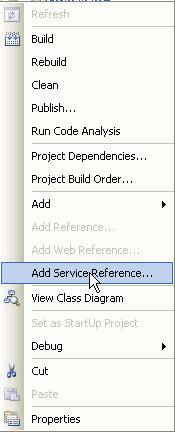
As for the generatedClient.cs this code can be generated by right-clicking the client project and selecting “ Add Service Reference...”:

App Config File
<?xml
version="1.0"
encoding="utf-8"
?>
<configuration>
<system.serviceModel>
<client>
<endpoint
name=""
address="http://localhost/WCFSample1/service.svc"
binding="wsHttpBinding"
contract="localhost.ICalculator"
/>
</client>
</system.serviceModel>
</configuration>
Running The Application
- Place the code above in the same directory (say, c:\samples\basicWCF)
- Ensure that IIS and WCF are installed (More details on this can be found by looking up ServiceModelReg.exe in MSDN)
- Create a new IIS virtual directory and map it to the location where the above source is located. Accept all defaults. Use an alias of WCFSample1 (this alias is used in the client’s app.config file)
- Run the client.