
There are two common techniques for translating between the XML Infoset and some format suitable for use by computer programs. These two techniques are based on taking the abstractions of the Infoset and projecting them into an object model that allows programmers to work in terms of abstract information items. These two techniques are Simple API for XML (SAX) and the Document Object Model (DOM).
There are two fundamental differences between SAX and DOM:
I choose not to cover SAX. However, Essential XML by Don Box has excellent overview. More information can also be obtained from www.xml.org/xml-dev and www.megginson.com/SAX.
The DOM is a set of abstract interfaces that model the Infoset. The DOM is entirely defines in terms of abstract interfaces and implementations are free to implement those interfaces as they choose.
The object model of the DOM represents the Infoset as tree of nodes. The focal point of the DOM is the Node interface, which acts as the base interface for all node types. The fact is almost everything is a Node makes traversal code uniform as a standard set of methods is available no matter where we are in the object model. However, each node also supports an extended interface type that exposes information item-specific functionality. The following figure shows the UML diagram of the DOM, and the table that follows shows the various node types and their corresponding Infoset information item.
Note carefully how the following XML document maps into the DOM.
<!-- Simple XML document-->
<?xml version="1.0" ?>
<?order alpha ascending?>
<art xmlns="http://www.diranieh.com/xml" >
<!-- First period -->
<period name="Renaissance">
<artist>Leonardo Da Vincie</artist>
<artist>Donatello</artist>
</period>
</art>

Note that the topmost item in the DOM structure corresponds to the document information item and is of type Document. Note that to access the value of a given node, say <artist>, you must not use the nodeValue property of that element, but rather access the Text node that is the child of that element. The nodeValue of the Text node is the one that contains the character data reflecting the element content.
The DOM consists soley of abstract interfaces and has no concrete classes. Each implementation of the DOM must provide an object that implements DOMImplementation. This object acts as a rendez-vour point for all component-wide functionality. Given an object of type DOMImplementation one can create nodes of type Document and DocumentType. Most of the remaining node types (element, attribute, text, comment, etc.) can be created on the Document interface itself.
Dim xmldoc As New DOMDocument
Dim xmldoc2 As New DOMDocument
' Create a new document
xmldoc.loadXML "<?xml version='1.0' ?><MyDocument/>"
xmldoc2.loadXML "<?xml version='1.0' ?><MyDocument2/>"
' The Document provides factory methods for creating many types of nodes
Dim xmlComment As IXMLDOMComment
Set xmlComment = xmldoc.createComment("This comment was inserted with createComment")
xmldoc.appendChild xmlComment
' Note that when a node is created by a document, that node can only be inserted
into that document. To insert a
' node created by a foreign document, we must use importNode (not yet implemented in MSXML3)
xmldoc2.appendChild xmlComment
' ERROR
xmldoc2.importNode
' CORRECT (but not supported!)
' It is always possible to find the Document with which a node is associated
' via the ownerDocument attribute
Dim xmlOwnerDoc As DOMDocument
Set xmlOwnerDoc = xmlComment.ownerDocument
The primary purpose of the Node interface is to define the base functionality for all node types. It defines a set of attributes, methods, and constants that must be available on any node in the DOM hierarchy. This makes it possible to traverse the DOM hierarchy in a uniform fashion using the Node interface. The more specific interfaces are used when it is necessary to access features that only make sense for a given node type.
To maintain the generality of the Node interface, the DOM does not rely on RTTI (Run-Time Type Information) capabilities in the programming language. Rather, the nodeType attribute is used to test a node for compatibility with a derived interface. Note that the Node interface defines a set of constants that correspond to the different node types (ATTRIBUTE_NODE, TEXT_NODE, ELEMENT_NODE, etc.)
Many node types support names. These names are exposed via nodeName attribute. However, there are several node types that do not have an obvious name, For example, the Node.nodeName attribute for a Document node is '#document', the Node.nodeName attribute for a Comment node is '#comment', and so on.
A node's value is accessed via the Node.nodeValue attribute. Certain nodes can have values whereas others cannot. For example, for Element nodes, their nodeValue is always NULL. To retrieve a value of an Element, retrieve the nodeValue for each of its Text node children
' Continuing from The
DOM and Factories example
' Determine node type
If xmldoc.nodeType = NODE_DOCUMENT Then
MsgBox "node is document"
End If
' Determine node name and node value
Dim strNodeName As String
Dim vNodeValue As Variant
strNodeName = xmldoc.nodeName '
#document
vNodeValue = xmldoc.nodeValue
' NULL
The following table lists the nodeName/nodeValue values for each of the possible node types.
| nodeType | nodeName | nodeValue |
|---|---|---|
| Element | Tag Name | NULL |
| Attr | Name of attribute | Value of attribute |
| Text | #text | Content of the text node |
| CDATASection | #cdata-section | Content of the CDATA section |
| EntityReference | Name of the entity referenced | NULL |
| Entity | Entity name | NULL |
| ProcessingInstruction | Target | Entire content excluding the target |
| Comment | #comment | Content of the comment |
| Document | #document | NULL |
| DocumentType | Document type name | NULL |
| DocumentFragment | #document-fragment | NULL |
| Notation | Notation name | NULL |
Note that nodeNameand nodeValue attributes are read-only. However, if you need to change a node's name or value on the fly (as in an XML editor), you have to create a completely new node with a new name and copy the node's value as appropriate.
The Node interface provides a set of attributes and methods that correspond to the [parent] and [children] relationships of the Infoset. For example, parentNode, firstChild, lastChild, previousSibling, nextSibling, etc. The following figure illustrates how these attributes relate to the example given in the Object model section.
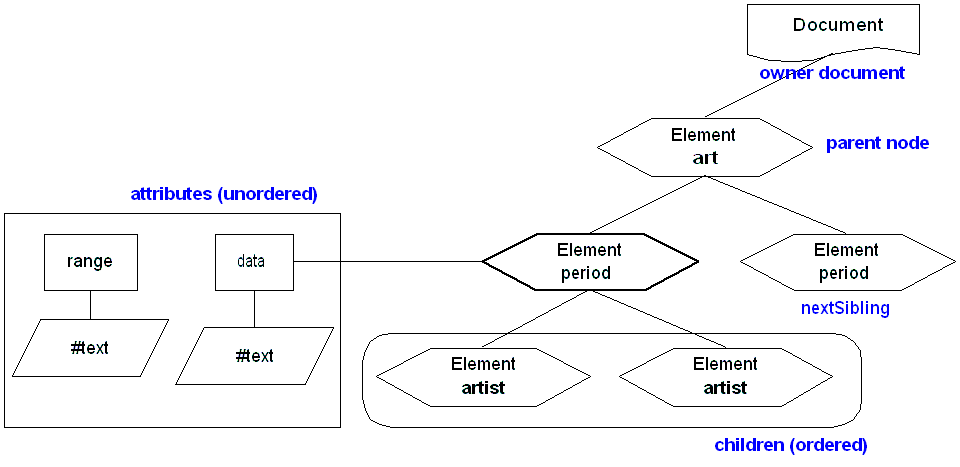
Due to the Node interface generality, not all aspects of the interface may apply to certain nodes. For example, a Document node does not have a parent. Similarly, since processing instruction information items do not have [children] property, the Node.firstChild, and Node.lastChild attribute of ProcessingInstructions nodes will always evaluate to NULL.
It is possible to perform a depth-first traversal of an XML document using firstChild and nextSibling. While this uses a sequential access pattern much like that imposed by a linked list, it is possible to use an array-like random access patterns using the NodeList interface. The NodeList interface provides random access to an ordered collection of nodes.
' Travers a DOM hierarchy using
nodeList
Private Sub TraversDoucmentUsingNodeList(current As IXMLDOMNode)
Static nLevel As Integer
' Get the nodeList of the current node
Dim listChildren As IXMLDOMNodeList
Dim nNumberOfNodes As Long
Set listChildren = current.childNodes
nNumberOfNodes = listChildren.length
'print appropriate number of tabs
Dim nTab As Integer
Dim strTab As String
For nTab = 0 To nLevel
strTab = strTab + vbTab
Next nTab
' Process the current node node (printing)
strNodeValue As String
If IsNull(current.nodeValue) Then
strNodeValue = "NULL"
Else
strNodeValue = current.nodeValue
End If
Debug.Print strTab & "NAME: " & current.nodeName & " VALUE: " & strNodeValue & " CHILD_COUNT: " & nNumberOfNodes & vbCrLf
' Traverse the DOM
hierarchy
Dim i As Long
For i = 0 To (nNumberOfNodes - 1)
nLevel = nLevel + 1
TraversDoucmentUsingNodeList listChildren.Item(i)
nLevel = nLevel - 1
Next i
End Sub
INPUT
<?xml version="1.0"?>
<?order alpha ascending ?>
<art xmlns="http://www.diranieh.com/xml">
<period name="Renaissance">
<artist>Leonardo da Vinci</artist>
<artist>Donatello</artist>
<artist>Yazano Diranici</artist>
</period>
<!-- add other periods here-->
</art>
<!--This comment was inserted with createComment-->
OUTPUT
NAME: #document VALUE: NULL CHILD_COUNT: 4
NAME: xml VALUE: version="1.0" CHILD_COUNT: 0
NAME: order VALUE: alpha ascending CHILD_COUNT: 0
NAME: art VALUE: NULL CHILD_COUNT: 2
NAME: period VALUE: NULL CHILD_COUNT: 3
NAME: artist VALUE: NULL
CHILD_COUNT: 1
NAME: #text VALUE: Leonardo da Vinci CHILD_COUNT: 0
NAME: artist VALUE: NULL
CHILD_COUNT: 1
NAME: #text VALUE: Donatello CHILD_COUNT: 0
NAME: artist VALUE: NULL
CHILD_COUNT: 1
NAME: #text VALUE: Yazano Diranici CHILD_COUNT: 0
NAME: #comment VALUE: add other periods here
CHILD_COUNT: 0
NAME: #comment VALUE: This comment was inserted with createComment CHILD_COUNT: 0
Note that DOM nodes are always associated with a particular Document. This association cannot be changed and is made explicit via the node's ownerDocument attribute. Also note that a node's ownerDocument attribute cannot be changed and will be the same for all nodes within a document.
The Node interface provides a set of methods for manipulating the DOM hierarchy - insertBefore, appendChild, removeChild, replaceChild, and CloneNode. These methods enforce the type constraints of the [children] property; one can use these method to add a Text child node to an Element node but not to a Document node. Both insertBefore and appendChild are used to add nodes to a hierarchy. insertBefore allows you to specify where to insert the new node whereas appendChild inserts the new node to the end of the list of children.
A given instance of Node can only appear once in a document hierarchy. When calling insertBefore or appendChild, if the node to be inserted already appears in the DOM hierarchy, it will automatically be removed from its current location before being inserted to a new location.
Private Sub InsertAndRemoveNodes()
' Select the 'period' node. See Navigation section on selectNodes
Dim lstNodes As IXMLDOMNodeList
Set lstNodes = xmldoc.selectNodes("/art/period")
' Now create the node to be appended
Dim nodeElement As IXMLDOMElement
Set nodeElement = xmldoc.createElement("artist")
nodeElement.Text = "Michael Angelo"
' Insert a new 'Artist' node to the first (and only) Period node
lstNodes.Item(0).appendChild nodeElement
' Remove first child
Dim nodeFirst As IXMLDOMNode
Set nodeFirst = lstNodes.Item(0).firstChild
lstNodes.Item(0).removeChild nodeFirst
Debug.Print xmldoc.xml
End Sub
OUTPUT
<?xml version="1.0"?>
<?order alpha ascending ?>
<art xmlns="http://www.diranieh.com/xml">
<period name="Renaissance">
<artist>Donatello</artist>
<artist>Yazano Diranici</artist>
<artist xmlns="">Michael Angelo</artist>
</period>
<!-- add other periods here-->
</art>
<!--This comment was inserted with createComment-->
The Node.cloneNode provides a way to copy a Node and optionally all of its ancestor nodes. The newly created clone Node is not attached to any document hierarchy and has no parent until it is inserted using an insertion function such as appendChild, insertBefore , etc.
Finally, the various parent/child attributes of the Node interface are considered live in the face of updated. For example, the object returned by nodeList is not a static snapshot; any changes to the underlying content is automatically visible in the DOM hierarchy. This mean that care must be taken when dealing with them in certain cases, especially when deleting nodes.
There are a few structural Infoset properties that do not fit the [parent]/[children] relationships. These include the [attributes] property of an element information item, as well as the [notations] and [entities] properties of a document information item. Each of these properties exposes a collection of information items as an unordered collection that is accessed by name. To mode this, the DOM defines the NamedNodeMap interface (IXMLDOMNamedNodeMap in MSXML). The NamedNodeMap interface is used to access attribute, entity, and notation information items.
The [attributes] Infoset property can be accessed via the Node.attributes attribute
Private Sub AddAttributeToElement()
' Select the Period node element
Dim lstNodes As IXMLDOMNodeList
Set lstNodes = xmldoc.selectNodes("/art/period")
' Create a new attribute
Dim attNew As IXMLDOMAttribute
Set attNew = xmldoc.createAttribute("NewAtt")
attNew.nodeValue = "Value1"
' Get the named node map for the element to which a new attribute will be addd
Dim mapNamedNode As IXMLDOMNamedNodeMap
Set mapNamedNode = lstNodes.Item(0).Attributes
' Add the attribute
mapNamedNode.setNamedItem attNew
End Sub
The DOM defined a standard data type, DOMString, for representing character data in a source document. The CharacterData interface (IXMLDOMCharacterData in MSXML) extends the Node interface and provides behavior for inserting, appending, replacing, and deleting the DOMString's value. Note that the CharacterData interface is never implemented by itself. It is always implemented in tandem with an extended interface, such as the Text interface.
The text of an element is considered normalized when it contains no two adjacent Text nodes. In general, de-serializing an XML document into a DOM will yield normalized elements. However, when adding new Text elements into the DOM, one can end up with a de-normalized element. While completely legal, some XML technologies such as XPath will have difficulties handling de-normalized elements. This can be prevented using the Node.normalize method.
Private Sub CreateNormalizedText()
' Create two text nodes
Dim nodeText1 As IXMLDOMText, nodeText2 As IXMLDOMText
Set nodeText1 = xmldoc.createTextNode("Hello")
Set nodeText2 = xmldoc.createTextNode(" World")
' Append text nodes to the root element
xmldoc.documentElement.appendChild nodeText1
xmldoc.documentElement.appendChild nodeText2
' At this point, looking at
xmldoc.documentElement in the Watch window reveals that it has 4 child
nodes,
' an element node, a comment node, and two text nodes
corresponding to nodeText1 and nodeText2 Text nodes.
' Normalize all text nodes
xmldoc.documentElement.normalize
' At this point, looking at
xmldoc.documentElement in the Watch window reveals that it has 3 child
nodes,
' an element node, a comment node, and one text node.
End Sub
The parent of an Attr (IXMLDOMAttribute) node is always NULL, but the associated Element node is always available via the Attr.ownerElement attribute. While the attributes property is always available via Node.attributes, the Element interface defines Attr-specific methods that mirror the more generic NamedNodeMap methods - getAttribute, getAttributeNode, setAttribute, setAttributeNode, removeAttribute, removeAttributeNode.
The attribute-specific methods of Element are identical to using NamedNodeMap exposed via Node.attributes:
' Show two methods for adding an attribute to an element
Private Sub AddAttributeToElement()
' METHOD ONE
' Select the Period node element
Dim lstNodes As IXMLDOMNodeList
Set lstNodes = xmldoc.selectNodes("/art/period")
' Create a new attribute
Dim attNew As IXMLDOMAttribute
Set attNew = xmldoc.createAttribute("NewAtt")
attNew.nodeValue = "Value1"
' Get the named node map for the element to which a new attribute will be
added
Dim mapNamedNode As IXMLDOMNamedNodeMap
Set mapNamedNode = lstNodes.Item(0).Attributes
' Add the attribute
mapNamedNode.setNamedItem attNew
' METHOD TWO
Dim elem As IXMLDOMElement
Set elem = lstNodes.Item(0)
elem.setAttribute "NewAtt2", "Value2"
End Sub
Recall that the Document node represents the document information item in addition to acting as the factory for new nodes. The Document node has two related nodes that are given special status. One represents the root node of the doucment, and the other represents the document type declaration of the document. The root element of the document is exposed via the normal child node accessors as well as via the Document.documentElement attribute. Tthe document type declaration node is not a child node and is only accessible via Document.doctype attribute.
The Document interface provides Document.getElementsByTagName method to build a list of elements by name. Document.getElementsByTagNameis different from Element.getElementsByTagName is that Document.getElementsByTagName can return the root element.
The DocumentFragment node is a very light version of the Element node meant for DOM cut and paste operations. The DocumentFragment node is a generic container of other nodes that can be inserted as a group somewhere in the DOM hierarchy.
The key to understanding the DocumentFragment node is to know how other methods treat it when it is passed as a parameter
' Create a document fragment
dim frag as IXMLDOMDocumentFragment
set frag = doc.createDocumentFragment
' Attach nodes to frag
frag.appendChild( ... )
frag.appendChild( ... )
' Now append the fragment to the document element
doc.documentElement.appendChild( frag )
When frag is passed to appendChild(), the implementation knows to skip the node being passed as an argument, and instead enumerates its child nodes, appending each of them in turn. A DocumentFragment node never appears as a node in a document's parent/child hierarchy.
Error handling in DOM is handled using exceptions and return values. All exception thrown by the DOM must be compatible with the DOMException type. The DOM also specifies a list of ExceptionCode values and constant names that must be used by all DOM implementations.
Because certain programming languages like VB do not support exceptions, DOM leaves the overall exception handling requirements somewhat open.