Consuming a Simple Web Service With .NET SDK
Summary
To consume a Web Service within your application, you need to have the
following:
- The location (URI) of the Web Service's WSDL file.
This can be found in a number of ways. Someone could supply it to you, you
could use DISCO to find it on a particular server, or you could use a UDDI
search engine for Web Services.
- A proxy to the Web Service
This acts as a mediator for all requests to and all responses from a Web
Service.
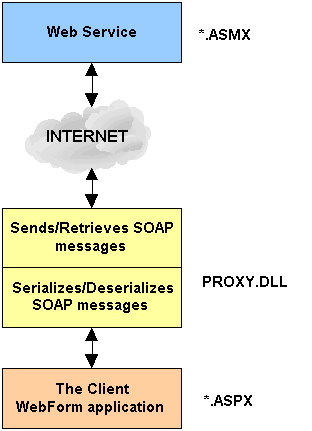
The proxy is important because it hides the gory details of SOAP
serialization and network communication: The proxy allows you to develop
your application as if the Web Service resided locally on your computer. It
serializes method request to SOAP and then sends the SOAP message to the Web
Service via the network. After the Web Service has finished processing your
request and returns its results encoded in a SOAP message, the proxy
intercepts the message and deserializes it and returns the result to the
calling application.
wsdl.exe is a .NET utility to generate
code for Web Service clients and ASP.NET Web Services from WSDL contract
files. You use this tool to create a proxy for your Web Service so that
you can use it in your Web Forms application. The following listing has been
created for the pmcalc Web Service which was described in Creating
Web Service With .NET SDK using the command:
wsdl.exe /l:CS http://localhost/pmcalc/pmcalc.asmx?wsdl
//------------------------------------------------------------------------------
// <autogenerated>
// This code was generated by a tool.
// Runtime Version: 1.0.2914.16
//
// Changes to this file may cause incorrect behavior and will be lost if
// the code is regenerated.
// </autogenerated>
//------------------------------------------------------------------------------
//
// This source code was auto-generated by wsdl, Version=1.0.2914.16.
//
using System.Diagnostics;
using System.Xml.Serialization;
using System;
using System.Web.Services.Protocols;
using System.Web.Services;
/* Note that the class pmcalc inherits from System.Web.Services.Protocols.SoapHttpClientProtocol
and then uses the this keyword
to refer to its instance */
[System.Web.Services.WebServiceBindingAttribute(Name="pmcalcSoap", Namespace="http://tempuri.org/")]
public class pmcalc : System.Web.Services.Protocols.SoapHttpClientProtocol
{
/* Sets properties such as the URL when
the class is instantiated*/
[System.Diagnostics.DebuggerStepThroughAttribute()]
public pmcalc()
{
this.Url = "http://localhost/chapter2/pmcalc.asmx";
}
/* This Web Service has three methods.
The first is Square which you use in your Web Services
applications. The next two methods, BeginSquare and EndSquare
allow for asynchronous calls to
the Web Service.
When the Web Forms application calls the Square method, this
class calls invoke on itself. This
starts the serialization and transportation of your
information over the network and also handles
deserialization in the response to your call. All this
functionality is encapsulated in the
System.Web.Services.Protocols.SoapHttpClientProtocol class */
[System.Diagnostics.DebuggerStepThroughAttribute()]
[System.Web.Services.Protocols.SoapDocumentMethodAttribute("http://tempuri.org/Square",
Use=System.Web.Services.Description.SoapBindingUse.Literal,
ParameterStyle=System.Web.Services.Protocols.SoapParameterStyle.Wrapped)]
public int Square(int
nNum)
{
object[] results = this.Invoke("Square", new object[] {nNum});
return ((int)(results[0]));
}
/* BeginSquare and EndSquare allow for
asynchronous calls to the Web Service */
[System.Diagnostics.DebuggerStepThroughAttribute()]
public System.IAsyncResult BeginSquare(int nNum, System.AsyncCallback callback, object
asyncState)
{
return this.BeginInvoke("Square", new object[] {nNum}, callback, asyncState);
}
[System.Diagnostics.DebuggerStepThroughAttribute()]
public int EndSquare(System.IAsyncResult
asyncResult)
{
object[] results = this.EndInvoke(asyncResult);
return ((int)(results[0]));
}
}
Now that you have the source code to the proxy, you need to compile it into a
.NET assembly using either the VB.NET compiler vbc.exe
or C# compiler csc.exe. To compile the pmcalc.cs
proxy class:
csc /out:bin\pmcalc.dll /target:library pmcalc.cs
Now that you have created the proxy code file and compiled it into a .NET
assembly, you need to create an ASP.NET Web Forms page to call your Web Service
and display results to the user's Web browser. Note that in the following code you are not using typical HTML fields. Instead you are using ASP.NET
server-side controls. When these tags are processed at the server (runat=server),
the ASP.NET Web Forms HTML handler interprets and renders them as HTML. These
server-side controls give you a high degree of programmability when creating
your Web Forms applications. The following file is saved as default.aspx.
<html>
<head>
<title>Sample Web Service</title>
<script Language=CSharp runat=server>
public void btnGo_Click(Object Sender, System.EventArgs e)
{
// Note how we reference
and call the Web Service as if were
// implemented locally on this machine. This is the
purpose of
// the proxy: to make method calls transparent
to the
// user-programmer
pmcalc o = new pmcalc();
// Convert the
entered number into Int32
Int32 intNum;
intNum = Convert.ToInt32(txtNumber.Text);
// Invoke the
Web Service via the proxy
lblResult.Text = o.Square(intNum).ToString();
}
</script>
</head>
<body>
<form runat=server>
<p>Enter number:
<asp:textbox id=txtNumber size=5 runat=server />
<asp:button id=btnGo text="Compute Square" runat=server onClick=btnGo_Click />
</p>
<p>Result = <asp:label id=lblResult
runat=server/></p>
</form>
</body>
</html>
Output Result:

Here is a quick summary of all files involved in this Web Service:
- pmcalc.asmx : The
Web Service file that defines the operations that will be invoked on the
server-side.
- pmcalc.cs
: The C# proxy file generated from pmcalc.asmx.
- pmcalc.dll
: The compiled binary of the proxy source file (pmcalc.cs).
- default.aspx : The Web
Service client.