This chapter discusses how to utilize the header section of the SOAP messages that get sent to and received from Web Services. Basically, the .NET Framework provides interfaces that allow you to easily append or read data from SOAP headers. These interfaces allow full control of the header and prevent developers from creating improperly formatted header messages.
Recall that a SOAP header is an optional part of the SOAP message. It is intended for additional information that is not part of the SOAP call, but might be important in the context of processing the method call. An example of such additional information could be some account ID, a date/time stamp, a transaction vote, or even an encryption key.
To utilize SOAP headers, a Web Method must add an additional attribute called SoapHeader, which specifies that the affected Web Method will use the SOAP header section of the SOAP message returned from the said Web Method. Further properties of the SoapHeader attribute can indicate whether the header is required or not (Required), and whether it is accepted and returned from the Web Service (Direction). The constructor argument for the SoapHeader attribute must refer to a data member of the WebService class that will represent the SOAP header contents. This data member is often a class with the required data members. As a result, the SOAP request message Web Method SendGreeting in example SOAP Headers will look like
<?xml version="1.0" encoding="utf-8" ?>
<soap:Envelope ... >
<soap:Header>
<hdrInfo xmlns="http://tempuri.org"/>
<strUserName>Yazan</strUserName>
<dtNow>23:00:12</dtNow>
</soap:Header>
<soap:Body>
...
</soap:Body>
</soap:Envelope>
The SoapHeader attribute connects a definition of a user-defined class derived from System.Web.Services.Protocols.SoapHeader with a Web Service method. In fact, you can derive many classes from System.Web.Services.Protocols.SoapHeader and associate all of them with the Web Service method by simply appending more SoapHeader attributes, as shown below:
[WebMethod]
[SoapHeader("FirstHeader", Required=true, Direction=SoapHeaderDirection.InOut)]
[SoapHeader("SecondHeader", Required=true, Direction=SoapHeaderDirection.InOut)]
[SoapHeader("ThirdHeader", Required=true, Direction=SoapHeaderDirection.InOut)]
public void SomeWebMethod()
{
...
}
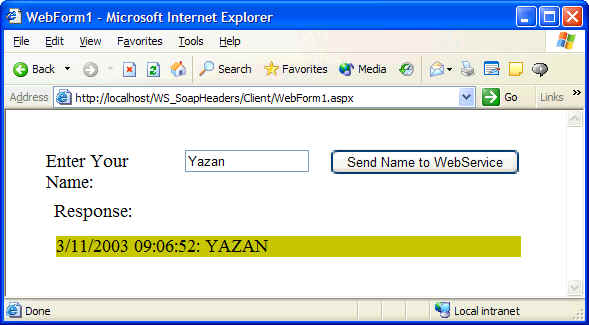
Where FirstHeader, SecondHeader, and ThirdHeader are the names of member variables that are instances of user-defined classes deriving from System.Web.Services.Protocols.SoapHeader class (see the WebService example in SOAP Headers). The Required property indicates whether the SOAP header is required to be in the SOAP message. If it was set to true and there was no header, an exception of type SoapHeaderException will be thrown. The Direction property indicates whether the header is sent from client to Web Service only, or from Web Service to client only, or is sent back and forth between the Web Service and the client. Result from the SOAP Headers sample is shown below:
According to the SOAP specification, SOAP headers can be sent to your Web Service even though your Web Service has not defined any and is not expecting to receive any. There are two approaches to handle this:
The .NET Framework classes for Web Services give Web Service creators and consumers some control on how to process SOAP headers. When a SOAP message is deserialized and converted into objects, a special collection of SOAP headers called SoapUnknownHeaders is created and made accessible to the Web Service. Developers of Web Services can choose to look at this collection to determine what to do with each header. The developer can programmatically set the DidUnderstand property on each SOAP header. The client can then check this property to determine which headers were processed by the Web Service. Therefore, Web Services should pay special attention to the DidUnderstand property so that the client receives feedback about the success of failure of the Web Service to understand and process that header.